
PR この記事には広告(アフィリエイトリンク)が含まれています。 詳細
PlayFrameworkをGradleで動かしたい
前回、sbtを使ったPlayFrameworkのプロジェクト作成方法についてご紹介しました。
 関連記事
【爆速環境構築】sbtを使ったPlayFramework2.7のプロジェクト作成方法【Java】
IT
Homebrew
Java
Mac
アプリケーション
関連記事
【爆速環境構築】sbtを使ったPlayFramework2.7のプロジェクト作成方法【Java】
IT
Homebrew
Java
Mac
アプリケーションしかし、Gradle信者な筆者はどうにかしてPlayFrameworkをsbtでは無くGradleから実行出来ないのか?と調べてみたところ、Gradleから公式のPlayFramework用のプラグインが提供されていたので、試しに使って起動までを動作確認してみました。
手順
環境
今回は以下の環境で試してみようと思います。
- PlayFramework 2.6.25
- Scala 2.12
- Gradle 5.6.4
PlayFramework2.7以上、Scala2.13以上はサポート外
こちらのGradle-PlayFrameworkプラグインはPlayFramework2.7以上、Scala2.13以上はサポートしておらず、あくまでPlayFramework~2.6、Scala~2.12までしか正常に動かないとのことです。
試しに、PlayFramework2.7.3、Scapa2.13で試したところ、java.lang.NoClassDefFoundError: scala/Serializableエラーが出てうまく起動しませんでした><
> Task :runPlay
java.lang.NoClassDefFoundError: scala/Serializable
        at play.doc.JarRepository.<init>(FileRepository.scala:109)
        at play.docs.BuildDocHandlerFactory.fromJar(BuildDocHandlerFactory.java:126)
        at java.base/jdk.internal.reflect.NativeMethodAccessorImpl.invoke0(Native Method)
        at java.base/jdk.internal.reflect.NativeMethodAccessorImpl.invoke(NativeMethodAccessorImpl.java:62)
        at java.base/jdk.internal.reflect.DelegatingMethodAccessorImpl.invoke(DelegatingMethodAccessorImpl.java:43)
        at java.base/java.lang.reflect.Method.invoke(Method.java:566)
        at org.gradle.playframework.tools.internal.run.DefaultVersionedPlayRunAdapter.getBuildDocHandler(DefaultVersionedPlayRunAdapter.java:116)
        at org.gradle.playframework.tools.internal.run.PlayWorkerServer.startServer(PlayWorkerServer.java:78)
        at org.gradle.playframework.tools.internal.run.PlayWorkerServer.start(PlayWorkerServer.java:63)
        at org.gradle.playframework.tools.internal.run.PlayWorkerServer.execute(PlayWorkerServer.java:46)
        at org.gradle.playframework.tools.internal.run.PlayWorkerServer.execute(PlayWorkerServer.java:21)
        at org.gradle.process.internal.worker.child.ActionExecutionWorker.execute(ActionExecutionWorker.java:91)
        at org.gradle.process.internal.worker.child.ActionExecutionWorker.execute(ActionExecutionWorker.java:34)
        at org.gradle.process.internal.worker.child.SystemApplicationClassLoaderWorker.call(SystemApplicationClassLoaderWorker.java:136)
        at org.gradle.process.internal.worker.child.SystemApplicationClassLoaderWorker.call(SystemApplicationClassLoaderWorker.java:69)
        at worker.org.gradle.process.internal.worker.GradleWorkerMain.run(GradleWorkerMain.java:68)
        at worker.org.gradle.process.internal.worker.GradleWorkerMain.main(GradleWorkerMain.java:73)
Caused by: java.lang.ClassNotFoundException: scala.Serializable
        at java.base/java.net.URLClassLoader.findClass(URLClassLoader.java:471)
        at java.base/java.lang.ClassLoader.loadClass(ClassLoader.java:588)
        at java.base/java.lang.ClassLoader.loadClass(ClassLoader.java:521)
        ... 17 more
<===========--> 90% EXECUTING [17s]
PlayFramework2.7以上、Scapa2.13以上でも動くならかなり実用性は上がるんですけどね。。。orz
build.graldeの作成
まずはbuild.sbtに変わってbuild.gradleを作成しましょう。
plugins {
    id 'org.gradle.playframework' version '0.9'
}

def playVersion = "2.6.25"
def scalaVersion = "2.12"

repositories {
    jcenter()
    maven {
        name "lightbend-maven-release"
        url "https://repo.lightbend.com/lightbend/maven-releases"
    }
    ivy {
        name "lightbend-ivy-release"
        url "https://repo.lightbend.com/lightbend/ivy-releases"
        layout "ivy"
    }
}
play {
    injectedRoutesGenerator = true
}
dependencies {
implementation "com.typesafe.play:play-guice_${scalaVersion}:${playVersion}"
testImplementation "com.typesafe.play:play-guice_${scalaVersion}:${playVersion}"
}
build.sbtやprojectディレクトリは不要なので削除してしまって問題ありません。
gradle runPlayで実行
サーバーを起動する際にはgradle runPlayで実行可能です。
gradle runPlay
<======-------> 50% EXECUTING [1m 4s]
> :compileScala > Resolve files of :compileClasspath > spring-beans-4.3.11.RELEASE.jar > 101 KB/745 KB downloaded
> :compileScala > Resolve files of :compileClasspath > spring-core-4.3.11.RELEASE.jar > 335 KB/1.07 MB downloaded
> :compileScala > Resolve files of :compileClasspath > guava-22.0.jar > 480 KB/2.46 MB downloaded
> :compileScala > Resolve files of :compileClasspath > joda-time-2.9.9.jar
> :compileScala > Resolve files of :compileClasspath > scala-java8-compat_2.12-0.8.0.jar > 589 KB/1.11 MB downloaded
> :compileScala > Resolve files of :compileClasspath > hibernate-validator-5.4.1.Final.jar > 223 KB/744 KB downloaded
> :compileScala > Resolve files of :compileClasspath > spring-context-4.3.11.RELEASE.jar > 342 KB/1.09 MB downloaded
> :compileScala > Resolve files of :compileClasspath > play_2.12-2.6.15.jar > 509 KB/2.60 MB downloaded
> :compileScala > Resolve files of :compileClasspath > akka-protobuf_2.12-2.5.11.jar > 397 KB/473 KB downloaded
> :compileScala > Resolve files of :compileClasspath > play-json_2.12-2.6.9.jar > 336 KB/644 KB downloaded
> :compileScala > Resolve files of :compileClasspath > akka-actor_2.12-2.5.11.jar > 765 KB/3.06 MB downloaded
> :compileScala > Resolve files of :compileClasspath > play-functional_2.12-2.6.9.jar > 115 KB/173 KB downloaded
> :compileScala > Resolve files of :compileClasspath > commons-lang3-3.6.jar > 336 KB/483 KB downloaded
> :compileScala > Resolve files of :compileClasspath > config-1.3.2.jar > 16 KB/279 KB downloaded
> :compileScala > Resolve files of :compileClasspath > reflections-0.9.11.jar > 65 KB/130 KB downloaded
> :compileScala > Resolve files of :compileClasspath > jackson-databind-2.8.11.1.jar > 287 KB/1.19 MB downloaded
...
(略)
...
No play.logger.configurator found: logging must be configured entirely by the application.
--- (Running the application, auto-reloading is enabled) ---

SLF4J: Failed to load class "org.slf4j.impl.StaticLoggerBinder".
SLF4J: Defaulting to no-operation (NOP) logger implementation
SLF4J: See http://www.slf4j.org/codes.html#StaticLoggerBinder for further details.
SLF4J: Failed to load class "org.slf4j.impl.StaticMDCBinder".
SLF4J: Defaulting to no-operation MDCAdapter implementation.
SLF4J: See http://www.slf4j.org/codes.html#no_static_mdc_binder for further details.

> Task :runPlay
Running Play App (:runPlay) at http://localhost:9000/

Deprecated Gradle features were used in this build, making it incompatible with Gradle 6.0.
Use '--warning-mode all' to show the individual deprecation warnings.
See https://docs.gradle.org/5.6.4/userguide/command_line_interface.html#sec:command_line_warnings

BUILD SUCCESSFUL in 2s
7 actionable tasks: 1 executed, 6 up-to-date

Reloadable deployment detected. Entering continuous build.

Deprecated Gradle features were used in this build, making it incompatible with Gradle 6.0.
Use '--warning-mode all' to show the individual deprecation warnings.
See https://docs.gradle.org/5.6.4/userguide/command_line_interface.html#sec:command_line_warnings

BUILD SUCCESSFUL in 169ms
7 actionable tasks: 1 executed, 6 up-to-date

Waiting for changes to input files of tasks... (ctrl-d to exit)
<=============> 100% EXECUTING [17s]
> IDLE
このログが出力されればサーバー起動が成功しているので、同じようにhttp://localhost:9000/ にアクセスすれば画面が表示されます。
JUnitも実行可能かつGradleレポートも自動生成可能
もちろん、gralde経由でのJUnitの実行もgradle testにて可能です。
> Task :compileTestScala
Pruning sources from previous analysis, due to incompatible CompileSetup.

> Task :test
WARNING: An illegal reflective access operation has occurred
WARNING: Illegal reflective access by com.google.inject.internal.cglib.core.$ReflectUtils$1 (file:/Users/blogenist/.gradle/caches/modules-2/files-2.1/com.google.inject/guice/4.1.0/eeb69005da379a10071aa4948c48d89250febb07/guice-4.1.0.jar) to method java.lang.ClassLoader.defineClass(java.lang.String,byte[],int,int,java.security.ProtectionDomain)
WARNING: Please consider reporting this to the maintainers of com.google.inject.internal.cglib.core.$ReflectUtils$1
WARNING: Use --illegal-access=warn to enable warnings of further illegal reflective access operations
WARNING: All illegal access operations will be denied in a future release

Deprecated Gradle features were used in this build, making it incompatible with Gradle 6.0.
Use '--warning-mode all' to show the individual deprecation warnings.
See https://docs.gradle.org/5.6.4/userguide/command_line_interface.html#sec:command_line_warnings

BUILD SUCCESSFUL in 4s
6 actionable tasks: 2 executed, 4 up-to-date
そしてGradleでユニットテストを行う最大の利点である、ケース単位のレポートHTMLの自動生成も活用出来ます!
出力先はデフォルトで `{プロジェクトディレクトリ}/build/reports/tests/test/index.html` となっています。
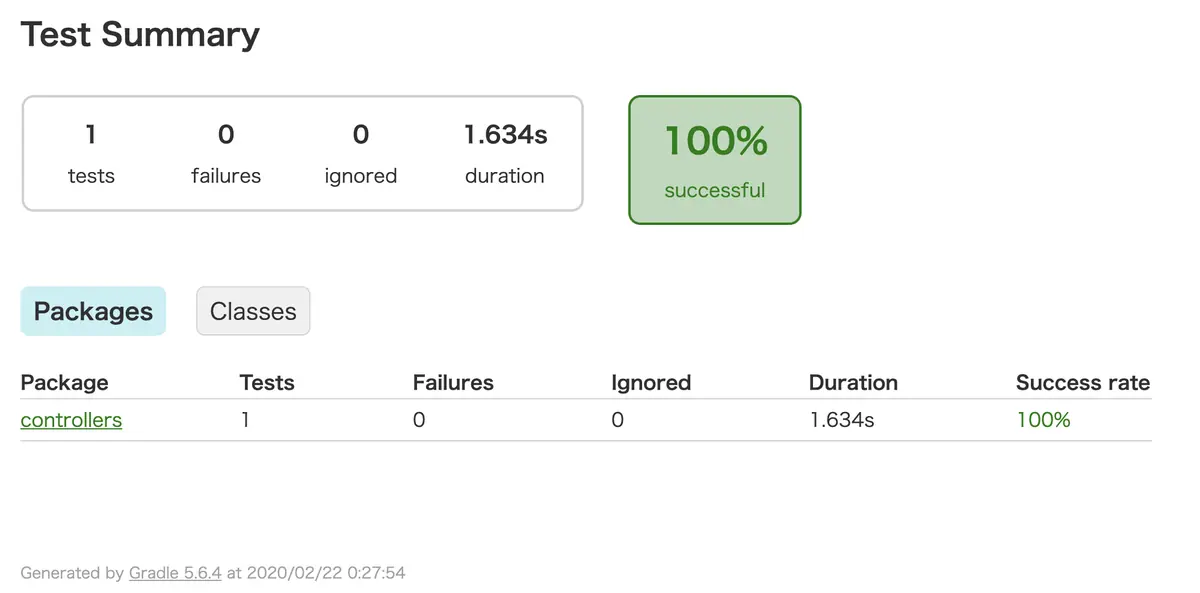
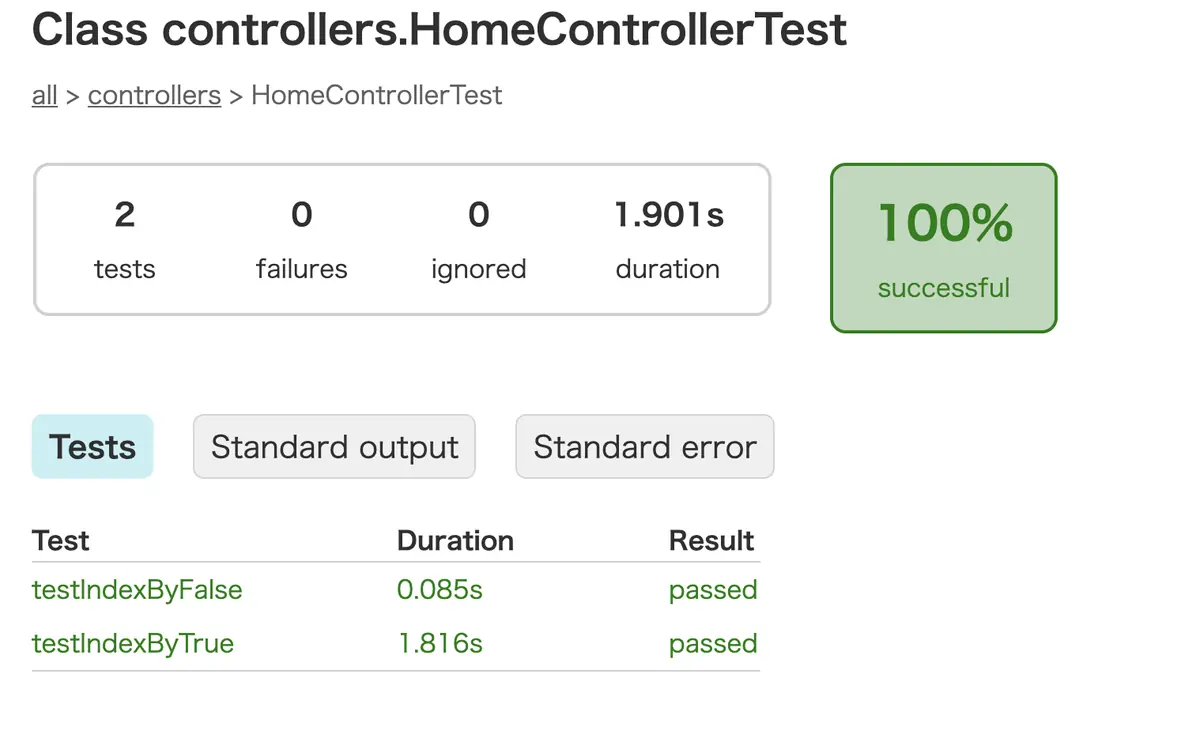
失敗時はこんな感じ。
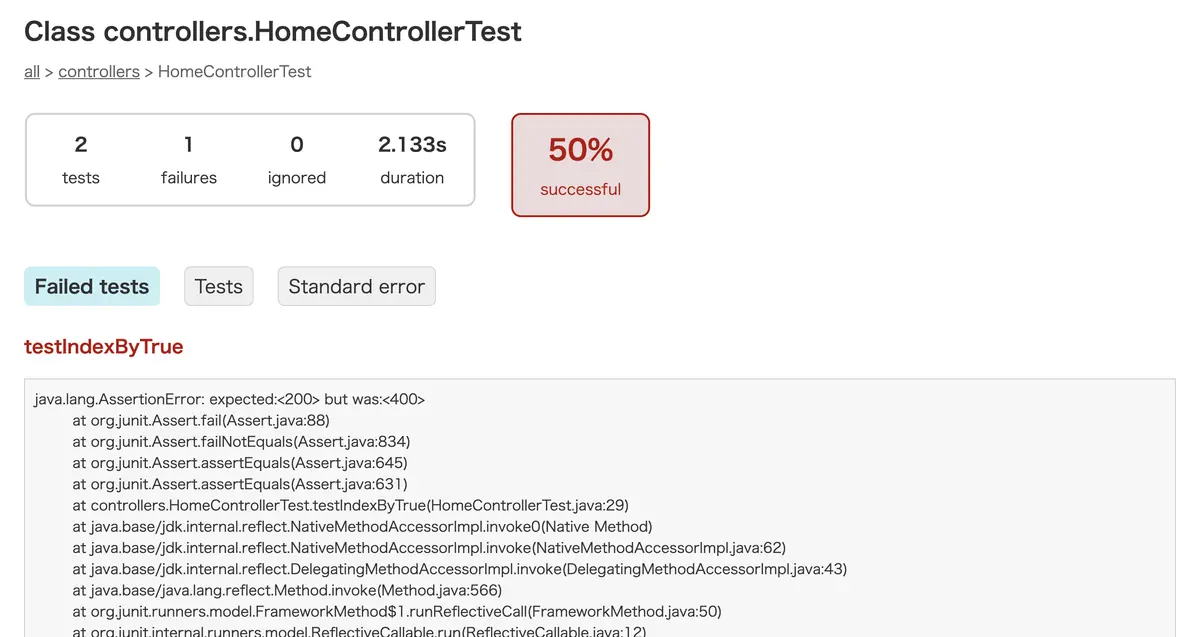
しっかりとテスト結果単位でログがレポートにまとまるので調査もしやすい・・・!
このレベルのレポートが標準で出力されるのはとても嬉しいですよね!
sbtじゃ出来ない部分なので、やはり筆者はGradleに惹かれてしまいます・・・!
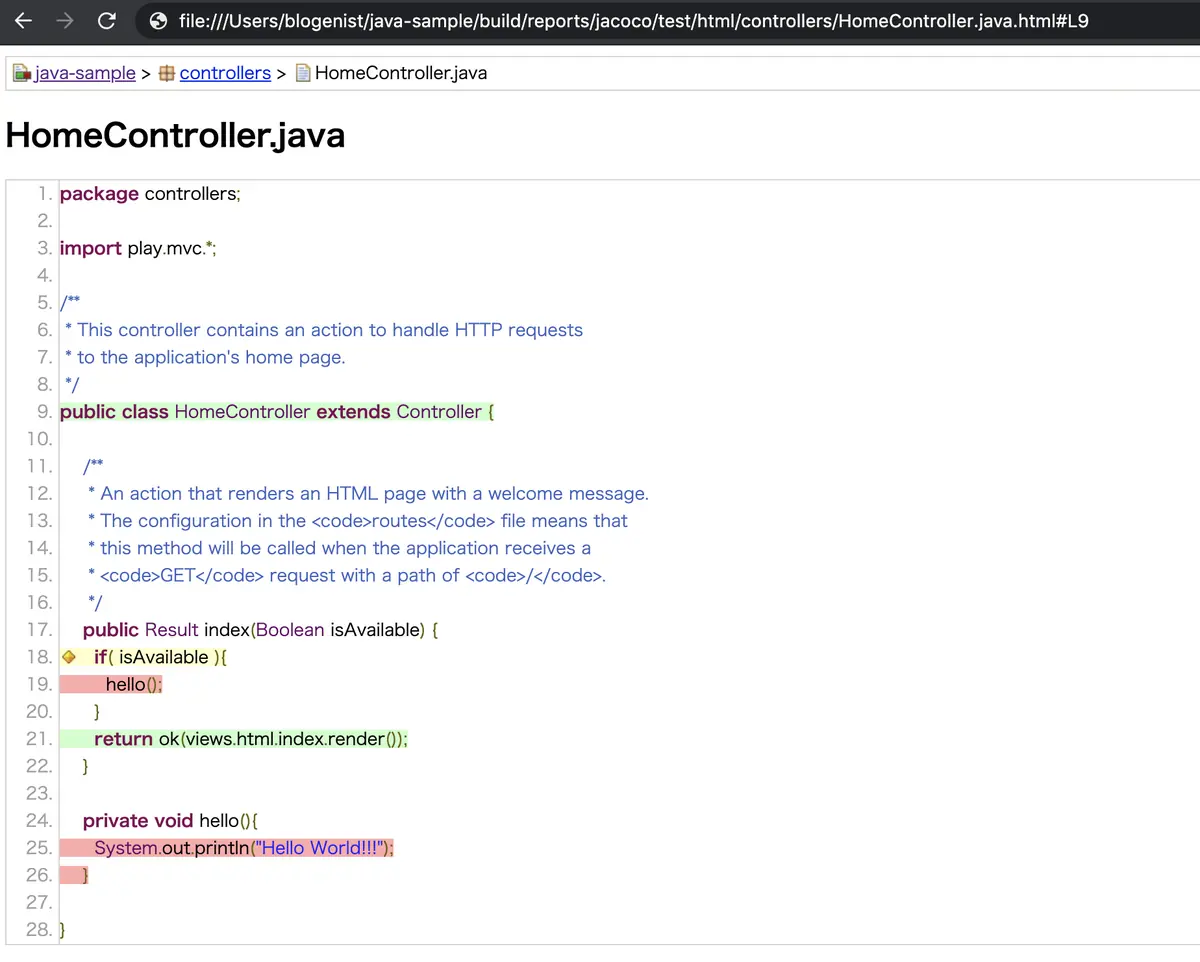
もちろんJaCoCoも利用可能
通常のsbt+JaCoCoで出来たガバレッジの出力についても問題無く可能です。
build.gradleに以下の一文を加えてください。
plugins {
    id 'org.gradle.playframework' version '0.9'
    id 'jacoco'   // ★追加
}
...
(略)
...
追記したらgralde test jacocoTestReportコマンドで生成されます。
終わりに
以上のように、PlayFrameworkをsbtではなくGradleで起動する事が出来ました。
Gradleも強力なビルドツールなので、気になる方は是非試してみてください♪