
PR この記事には広告(アフィリエイトリンク)が含まれています。 詳細
EclipseにおけるSpringBootデバック時の謎のエラー
Eclipse環境でSpringBootのシステムを開発している場合、もちろんデバッグを行うと思うのですが、SilentExitException という、謎のエラーが発生すると思います。
/*
 * Copyright 2012-2017 the original author or authors.
 *
 * Licensed under the Apache License, Version 2.0 (the "License");
 * you may not use this file except in compliance with the License.
 * You may obtain a copy of the License at
 *
 *      http://www.apache.org/licenses/LICENSE-2.0
 *
 * Unless required by applicable law or agreed to in writing, software
 * distributed under the License is distributed on an "AS IS" BASIS,
 * WITHOUT WARRANTIES OR CONDITIONS OF ANY KIND, either express or implied.
 * See the License for the specific language governing permissions and
 * limitations under the License.
 */

package org.springframework.boot.devtools.restart;

import java.lang.Thread.UncaughtExceptionHandler;
import java.util.Arrays;

/**
 * {@link UncaughtExceptionHandler} decorator that allows a thread to exit silently.
 *
 * @author Phillip Webb
 * @author Andy Wilkinson
 */
class SilentExitExceptionHandler implements UncaughtExceptionHandler {

	private final UncaughtExceptionHandler delegate;

	SilentExitExceptionHandler(UncaughtExceptionHandler delegate) {
		this.delegate = delegate;
	}

	@Override
	public void uncaughtException(Thread thread, Throwable exception) {
		if (exception instanceof SilentExitException) {
			if (isJvmExiting(thread)) {
				preventNonZeroExitCode();
			}
			return;
		}
		if (this.delegate != null) {
			this.delegate.uncaughtException(thread, exception);
		}
	}

	private boolean isJvmExiting(Thread exceptionThread) {
		for (Thread thread : getAllThreads()) {
			if (thread != exceptionThread && thread.isAlive() && !thread.isDaemon()) {
				return false;
			}
		}
		return true;
	}

	protected Thread[] getAllThreads() {
		ThreadGroup rootThreadGroup = getRootThreadGroup();
		Thread[] threads = new Thread[32];
		int count = rootThreadGroup.enumerate(threads);
		while (count == threads.length) {
			threads = new Thread[threads.length * 2];
			count = rootThreadGroup.enumerate(threads);
		}
		return Arrays.copyOf(threads, count);
	}

	private ThreadGroup getRootThreadGroup() {
		ThreadGroup candidate = Thread.currentThread().getThreadGroup();
		while (candidate.getParent() != null) {
			candidate = candidate.getParent();
		}
		return candidate;
	}

	protected void preventNonZeroExitCode() {
		System.exit(0);
	}

	public static void setup(Thread thread) {
		UncaughtExceptionHandler handler = thread.getUncaughtExceptionHandler();
		if (!(handler instanceof SilentExitExceptionHandler)) {
			handler = new SilentExitExceptionHandler(handler);
			thread.setUncaughtExceptionHandler(handler);
		}
	}

	public static void exitCurrentThread() {
		throw new SilentExitException(); // ここでエラーが発生
	}

	private static class SilentExitException extends RuntimeException {

	}

}
ブレークポイントを貼っているわけでもないのに、毎回デバッグ起動時に引っかかるので、正直とても厄介ですorz
実はこれ、spring-boot-devtoolsのバグのようです><
This is unfortunately a know issue with the new spring-boot-devtools module (see https://github.com/spring-projects/spring-boot/issues/3100). We use this trick to kill the main thread so that we can replace it with a re-loadable version. So far I've not found a way to prevent the debug breakpoint from triggering.For now, you can toggle the “suspend execution on uncaught exceptions” checkbox in Java -> Debug preferences to prevent it from happening.java - Breakpoint at “throw new SilentExitException()” in Eclipse + Spring Boot - Stack Overflow
しかし安心してください。
Eclipseの設定を変えるだけでエラーが発生する事無くなるので、今回はその手順をご紹介致します。
手順
Eclipseの設定変更
手順は簡単です。
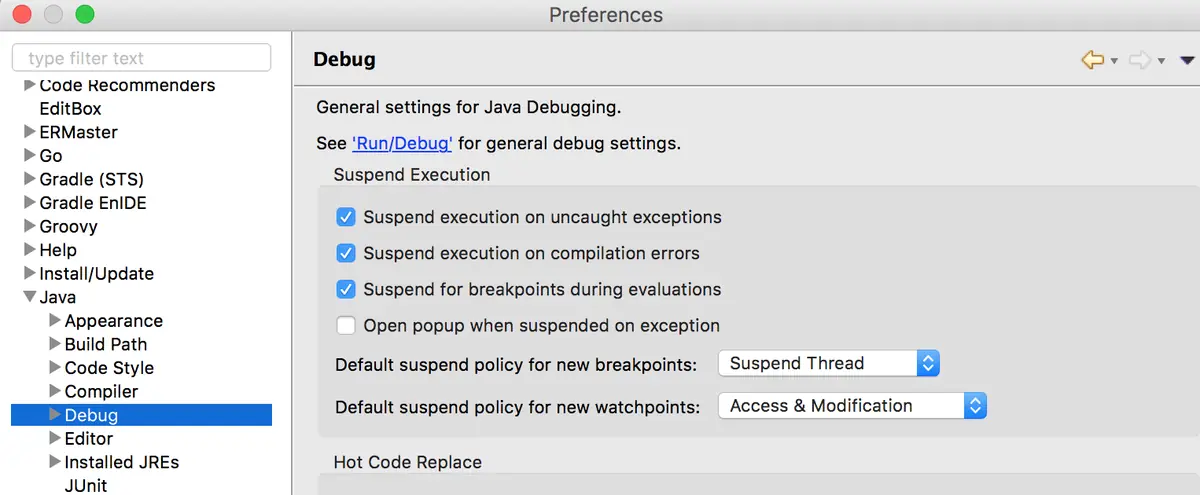
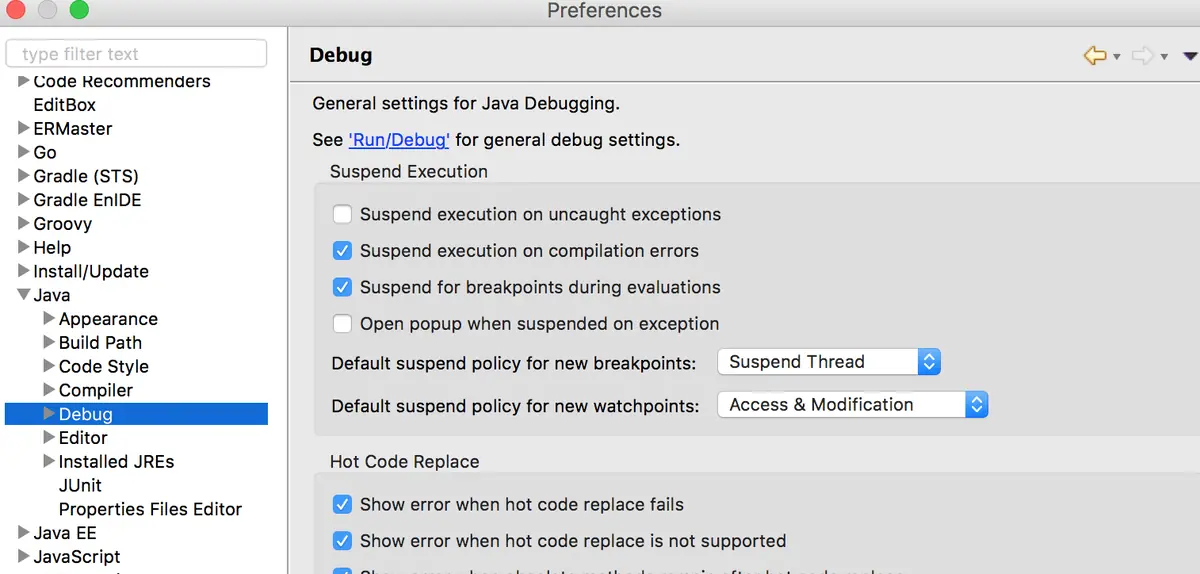
Eclipseの設定からJava>Debugを選択すると、Suspend execution on uncaught exceptionsにチェックが入っていると思います。
このチェックを外すだけでデバッグ起動時のエラーで引っかかる事がなくなります♪
終わりに
以上のように、EclipseでSpringBoot開発をやる際には必ずやっておいたほうが良い設定です。
小さな時間ロスも積み重なると作業時間を大量に無駄にしてしまうので、皆さんも早めに設定をしておくと良いでしょう♪