
PR この記事には広告(アフィリエイトリンク)が含まれています。 詳細
Vueプロジェクトをサブディレクトリにデプロイしたい
サイトなどを製作している場合、基本的にはhttp://localhost/{アプリケーション}の形で開発及び動作確認を行うと思います。
そして、いざ実装が終わりデプロイするぞ!!となった場合、レアケースですが、
「ルートじゃなくてサブディレクトリに配置して。」
と言われる事が稀にあります。笑
要件定義の時に確認しとけや!
という点は一旦置いといて、そんな急な要望が出た場合にもVue-cliを使ってプロジェクトを作っていれば柔軟に対応が可能になります。
手順
vue.config.jsの作成
まずはプロジェクトルートにvue.config.jsを作成しましょう。
.
├── README.md
├── babel.config.js
├── dist
├── node_modules
├── package.json
├── postcss.config.js
├── public
├── src
├── tsconfig.json
├── tslint.json
├── vue.config.js // 追加
└── yarn.lock
baseUrlを追加
次にvue.config.jsに以下の記述を追加してください。
module.exports = {
  baseUrl: "/{配置したいサブディレクトリ}/", // 追加
  ...
  (略)
  ...
};
assetsPublicPathは廃止
Vue-CLI 2系の場合はassetsPublicPathで指定していましたが、キー名が変わったので要注意です。
確認
では、実際に起動してみましょう。
yarn run v1.17.3
$ vue-cli-service serve
 WARN  "baseUrl" option in vue.config.js is deprecated now, please use "publicPath" instead.
 INFO  Starting development server...
Starting type checking and linting service...
Using 1 worker with 2048MB memory limit
10% building 2/2 modules 0 activeℹ 「wds」: Project is running at http://localhost:8080/
ℹ 「wds」: webpack output is served from /generator/qrcode/
ℹ 「wds」: Content not from webpack is served from /Users/blogenist/sample/public
ℹ 「wds」: 404s will fallback to /index.html
98% after emitting CopyPlugin

 DONE  Compiled successfully in 4743ms                                                                                                                                                                                                18:20:06

No type errors found
No lint errors found
Version: typescript 3.6.3, tslint 5.20.0
Time: 3049ms

  App running at:
  - Local:   http://localhost:8080/sub/dummy/
  - Network: unavailable

  Note that the development build is not optimized.
  To create a production build, run yarn build.
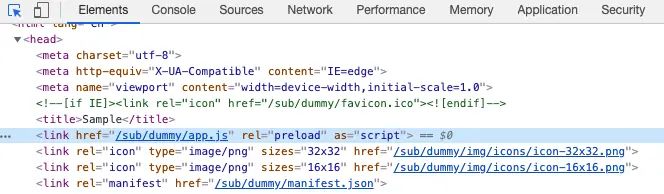
正常にbaseUrlが適用された状態で起動されました。
HTML内のリンクにもbaseUrlの値が差し込まれています。
baseUrlも廃止予定
無事に期待通りの動きが出来ましたが、ログに気になる文言が出力されていました。
yarn run v1.17.3
$ vue-cli-service build
 WARN  "baseUrl" option in vue.config.js is deprecated now, please use "publicPath" instead.
なにやら、baseUrlは非推奨なのでpublicPathを使ってね!との事です。
publicPathに変更
という事で言われた通りにbaseUrlをpublicPathに変更しましょう。
module.exports = {
  publicPath: "/{配置したいサブディレクトリ}/",
  ...
  (略)
  ...
};
指定の仕方は同じです。
確認
では再度実行してみましょう。
yarn run v1.17.3
$ vue-cli-service serve
 INFO  Starting development server...
Starting type checking and linting service...
Using 1 worker with 2048MB memory limit
10% building 2/2 modules 0 activeℹ 「wds」: Project is running at http://localhost:8080/
ℹ 「wds」: webpack output is served from /sub/dummy/
ℹ 「wds」: Content not from webpack is served from /Users/blogenist/sample/public
ℹ 「wds」: 404s will fallback to /index.html
98% after emitting CopyPlugin

 DONE  Compiled successfully in 3344ms                                                                                                                                                                                                18:31:16

No type errors found
No lint errors found
Version: typescript 3.6.3, tslint 5.20.0
Time: 2927ms

  App running at:
  - Local:   http://localhost:8080/sub/dummy/
  - Network: unavailable

  Note that the development build is not optimized.
  To create a production build, run yarn build.
無事、警告も消えて綺麗なログになりましたね♪
終わりに
以上のように、Vue-CLIを使っていれば急なデプロイ要望にも柔軟に対応する事が出来ました。
お困りの際はお試しください♪