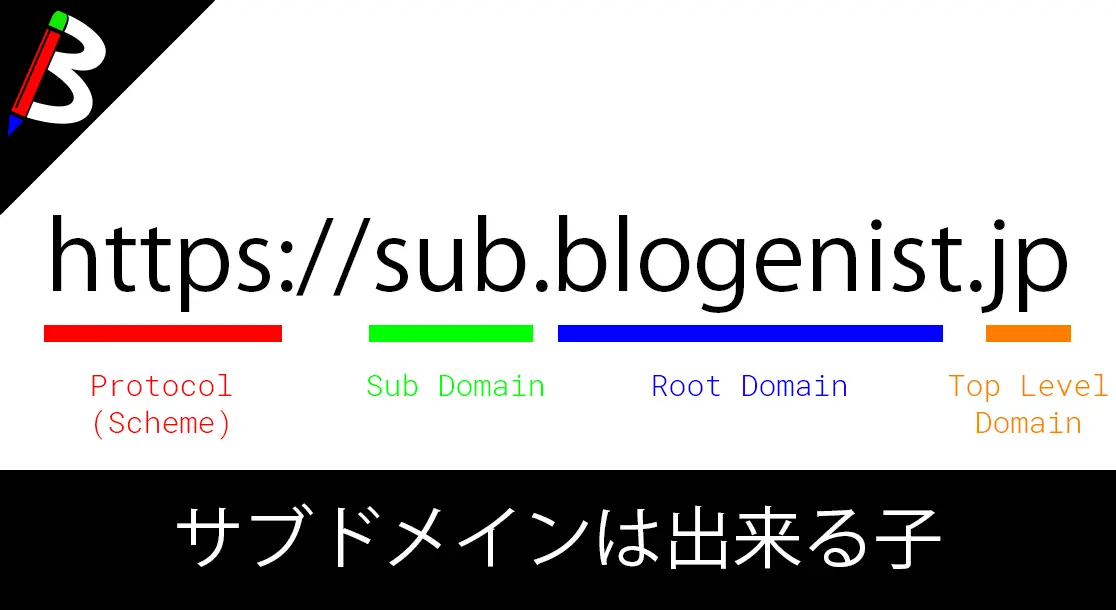
サブドメインとは?
お名前ドットコムのおさらい
以前、お名前ドットコムを利用したドメインの作成の仕方については、以下の記事にてご紹介をしました。
 関連記事
【2017年9月最新版!】副業でお小遣いを稼ごう!!独自ドメイン取得編
副業
GoogleAdsense
Wordpress
お小遣い稼ぎ
ブログ
関連記事
【2017年9月最新版!】副業でお小遣いを稼ごう!!独自ドメイン取得編
副業
GoogleAdsense
Wordpress
お小遣い稼ぎ
ブログしかし、いろいろ制作を進めていくと、サブドメインが欲しくなる場合があると思います。
サブドメイン?ルートドメイン?
そもそもサブドメインとは何なのか?
以前にお名前ドットコムで取得したドメインはルートドメインと呼ばれます。
簡単に説明すると、以下のようなイメージです。
ルートドメイン
- https://blogenist.jp
サブドメイン
- https://www.blogenist.jp
- https://sub.blogenist.jp
青色部分の差異があります。
サブドメインはルートドメインをさらに細かく分けて使いたい場合に用いられます。
サブドメイン?サブディレクトリ?
ルートドメインを利用しても複数サイトの運用は可能ですが、その場合はサブディレクトリによる運用となります。
例えば、blogenistのルートドメイン配下に、shop/book/foodという3つの関連する別のサイト(システム)があった場合に、サブディレクトリ/サブドメインそれぞれだと以下のような運用になると思われます。
※SEO観点では特に差は無いそうなので、この辺は好みになりますね
サブディレクトリ
- https://blogenist/shop/index.html
- https://blogenist/book/index.html
- https://blogenist/food/index.html
サブドメイン
- https://shop.blogenist/index.html
- https://book.blogenist/index.html
- https://food.blogenist/index.html
サブドメイン運用の例
Google様の例
例えば、天下のGoogle様なんかを例に挙げると、以下のようにサブドメインでの運用を行っています。
かなりマイクロサービス思考ですね。
大好きです。
| ルートドメイン | google.com | https://www.google.com/にリダイレクト |
|---|---|---|
| サブドメイン | www.google.com | Google検索 |
| docs.google.com | GoogleDocs | |
| mail.google.com | Gmail | |
| myaccount.google.com | Googleアカウント | |
| maps.google.com | GoogleMap | |
| play.google.com | GooglePlay | |
| news.google.com | Googleアカウント | |
| contacts.google.com | Google連絡先 | |
| drive.google.com | GoogleDrive | |
| plus.google.com | Google+ | |
| translate.google.com | Google翻訳 | |
| photos.google.com | Googleフォト | |
| books.google.com | Googleブックス | |
| hangout.google.com | Googleハングアウト | |
| keep.google.com | Googleキープ | |
| classroom.google.com | Googleクラスルーム | |
| earth.google.com | GoogleEarch |
Amazon様の例
Amazon様もGoogleほどでは無いですが、サブドメインで様々なサービスを持っています。
また、階層化サブドメインを振ることでサービスを小分けにしているようです。
| ルートドメイン | amazon.com | www.amazon.comにリダイレクト |
|---|---|---|
| サブドメイン | www.amazon.com | AmazonPrime |
| affiliate.amazon.com | Amazonアフェリエイト | |
| aws.amazon.com | Amazon Web Service | |
| console.aws.amazon.com | AWS Console | |
| us-east-1.console.aws.amazon.com | AWS Console 米国東部(バージニア北部) | |
| us-east-2.console.aws.amazon.com | AWS Console 米国東部 (オハイオ) | |
| us-west-1.console.aws.amazon.com | AWS Console 米国西部 (北カリフォルニア) | |
| us-west-2.console.aws.amazon.com | AWS Console 米国西部 (オレゴン) | |
| ca-central-1.console.aws.amazon.com | AWS Console カナダ (中部) | |
| eu-central-1.console.aws.amazon.com | AWS Console 欧州 (フランクフルト) | |
| eu-west-1.console.aws.amazon.com | AWS Console 欧州 (アイルランド) | |
| eu-west-2.console.aws.amazon.com | AWS Console 欧州 (ロンドン) | |
| eu-west-3.console.aws.amazon.com | AWS Console EU (パリ) | |
| ap-northeast-1.console.aws.amazon.com | AWS Console アジアパシフィック (東京) | |
| ap-northeast-2.console.aws.amazon.com | AWS Console アジアパシフィック (ソウル) | |
| ap-northeast-3.console.aws.amazon.com | AWS Console アジアパシフィック (大阪: ローカル) | |
| ap-southeast-1.console.aws.amazon.com | AWS Console アジアパシフィック (シンガポール) | |
| ap-southeast-2.console.aws.amazon.com | AWS Console アジアパシフィック (シドニー) | |
| ap-south-1.console.aws.amazon.com | AWS Console アジアパシフィック (ムンバイ) | |
| sa-east-1.console.aws.amazon.com | AWS Console 南米 (サンパウロ) |
終わりに
以上のように、ルートドメインだけではなく、サブドメインを使った運用を考えた方が将来性のあるドメイン運用になると筆者は思っております。
サブディレクトリ運用をしている大手サービスはちょっと思い浮かびませんでした。
サブドメインの追加自体は無料で出来る場合がほとんどなので、これからドメインを取得する方はもちろん、すでにルートドメインで運用をしている方もこのタイミングで運用方針を改めて見てはいかがでしょうか?